
Horizontal orientation, also known as widescreen view, is a feature that offers a different perspective when viewing content on electronic devices. This setting allows for a wider display compared to the traditional vertical layout.
When you switch to landscape mode, you can enjoy a more immersive experience while browsing websites, reading articles, or watching videos. The horizontal orientation provides a more natural view that closely resembles the way we perceive the world around us.
By utilizing widescreen display, you can optimize your screen space and enhance the visual appeal of your device. Whether you’re using a smartphone, tablet, or computer, exploring content in landscape mode can offer a refreshing change from the usual vertical setup.
Understanding Landscape Mode
Exploring the horizontal orientation of your device can enhance your viewing experience in various applications and settings. By turning your device sideways, you can unlock a wider perspective and engage with content in a different way. This feature provides a unique way to interact with your device and optimize your viewing experience.
Benefits of Landscape Mode: When your device is in landscape mode, you may notice that certain apps and websites adjust their layouts to better fit the wider screen. This can make reading text, watching videos, and browsing through photo galleries more comfortable and enjoyable. Additionally, some tasks, such as typing on a virtual keyboard, may be easier in landscape mode due to the increased spacing between keys.
Exploring New Possibilities: Landscape mode opens up new possibilities for multitasking, gaming, and creative work. You can compare two documents side by side, play immersive games that utilize the wider screen, or edit photos and videos with more precision. By experimenting with landscape mode, you can discover new ways to interact with your device and enhance your overall user experience.
The basics of viewing a wider perspective
When you want to explore a different orientation of your device to see more of what’s on your screen, you can switch to a wider perspective known as landscape mode. This feature allows you to view content horizontally instead of vertically, providing a new way to interact with your device.
- Enhanced viewing experience
- Optimal for watching videos
- Perfect for browsing websites
By simply rotating your device, you can access landscape mode and take advantage of the wider display. Whether you’re watching videos, playing games, or reading articles, landscape mode offers a whole new dimension to your viewing experience.
Benefits of using horizontal display format
When utilizing the horizontal view on your device, you can experience a multitude of advantages that enhance your overall user experience. Rather than confining yourself to the vertical orientation, switching to the landscape mode allows for greater flexibility and improved functionality.
- Enhanced visibility of content: By switching to landscape mode, you can view more information on the screen at once without excessive scrolling. This is particularly beneficial when reading articles, watching videos, or browsing websites.
- Improved multimedia experience: Many apps and games are optimized for landscape mode, providing a more immersive and enjoyable experience. Whether you’re gaming, streaming videos, or editing photos, landscape mode can enhance the visual quality and engagement.
- Efficient use of space: Landscape mode allows for better utilization of screen real estate, especially on larger devices like tablets. This results in a more organized and aesthetically pleasing layout, making it easier to multitask and navigate different apps.
- Enhanced productivity: When using productivity apps such as documents, spreadsheets, or calendars, landscape mode can increase efficiency by displaying more information on the screen simultaneously. This can help with multitasking and streamlining tasks.
- Comfortable viewing experience: For tasks that involve viewing content for an extended period, such as reading e-books or browsing social media feeds, landscape mode can reduce eye strain and provide a more comfortable viewing angle.
How to activate landscape view
Switching to a wider screen orientation on your device can greatly enhance your viewing experience. Below are some simple steps to adjust your device settings and activate the landscape mode.
- Open the settings menu on your device.
- Look for the display or screen settings option.
- Find the option to change the screen orientation and select landscape mode.
- Save your changes and exit the settings menu.
- Your device will now display content in landscape view, providing a wider perspective.
Enjoy the wider viewing angle and improved visual experience that landscape mode offers!
Tips for capturing stunning natural scenery

Enhance the beauty of your outdoor photographs with these expert suggestions for improving your landscape photography skills. Learn how to make the most of the natural light and choose the perfect composition to create captivating images that truly capture the essence of the great outdoors.
1. Time of day: Sunrise and sunset provide the most beautiful natural light for landscape photography. Take advantage of the warm, golden hues during these times of day to add depth and dimension to your photos.
2.composition: Use the rule of thirds to create visually appealing compositions. Place key elements off-center to create balance and interest in your images.
3. Foreground interest: Incorporate elements in the foreground to add depth and perspective to your landscapes. Rocks, trees, or flowers can serve as interesting focal points in your composition.
4. Leading lines: Use natural lines, like rivers, roads, or fences, to guide the viewer’s eye through the image and create a sense of movement and flow.
5. Experiment with different perspectives: Don’t be afraid to get low to the ground or climb to a higher vantage point to capture unique angles and viewpoints of the landscape.
Common errors to avoid when using the horizontal view
When utilizing the wide screen position of your device, there are several common mistakes that users often make that can impact their experience. It is important to be aware of these errors in order to optimize your use of the horizontal view.
1. Lack of proper orientation: Failing to orient your device correctly in landscape mode can lead to distorted images and text, making it difficult to read or view content.
2. Ignoring responsive design: Not all websites and apps are optimized for landscape mode, resulting in elements being cut off or not displaying properly. It is crucial to ensure that the content you are viewing is responsive to the horizontal view.
3. Overlooking navigation issues: Some applications may have navigation menus or buttons that are not easily accessible in landscape mode. This can make it challenging to navigate through the interface effectively.
4. Disregarding text alignment: Text that is not aligned properly in landscape mode can be difficult to read and may require excessive scrolling. It is important to ensure that text is formatted correctly for horizontal viewing.
Comparison between portrait and landscape orientation
When it comes to viewing content on your device’s screen, the orientation can play a significant role in how you interact with it. In portrait orientation, the device is taller than it is wide, while in landscape orientation, the device is wider than it is tall. Each orientation has its own advantages and disadvantages that cater to different needs and preferences.
Portrait Orientation
In portrait orientation, content is displayed vertically, which is ideal for reading text, scrolling through social media feeds, and making phone calls. This orientation is more natural for holding your device with one hand and allows for easy access to the on-screen keyboard for typing.
Landscape Orientation
On the other hand, landscape orientation provides a wider view of content, making it perfect for watching videos, playing games, and viewing photos. It offers a more immersive experience for multimedia content and allows for better multitasking by displaying multiple apps side by side.
| Portrait Orientation | Landscape Orientation |
|---|---|
| Ideal for reading text and scrolling through social media feeds | Perfect for watching videos and playing games |
| Easy access to on-screen keyboard for typing | Provides a wider view of content |
| More natural for holding device with one hand | Allows for better multitasking by displaying multiple apps side by side |
Advanced techniques for mastering the art of capturing wide vistas
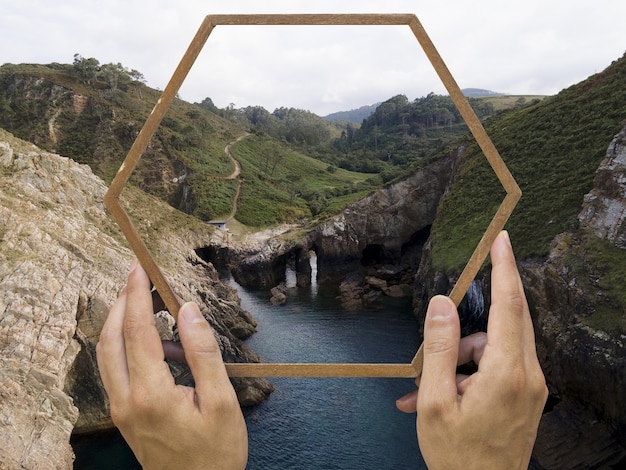
Enhancing your proficiency in utilizing the horizontal orientation of your device to take breathtaking images of expansive landscapes can significantly elevate the impact of your photography. By employing advanced strategies and techniques, you can unlock the full potential of wide-angle compositions and create visually stunning masterpieces.
Experiment with different perspectives
One of the key techniques for maximizing the potential of landscape mode is to experiment with various perspectives. By exploring different angles, heights, and distances from your subject, you can discover unique vantage points that offer a fresh and captivating view of the scene. This creative approach can add depth and dimension to your photographs, creating a more immersive and dynamic visual experience.
Utilize leading lines and framing techniques
Another advanced technique for mastering landscape mode is to incorporate leading lines and framing elements in your compositions. By strategically placing these visual aids within your frame, you can guide the viewer’s eye through the image and highlight the key elements of the scene. This compositional strategy helps create a sense of depth and dimensionality, enhancing the overall impact of your photographs.
Video:
how to enable landscape mode on Home Screen for Samsung Note 9 phones
how to enable landscape mode on Home Screen for Samsung Note 9 phones by * Gadget Guides * 1,072 views 3 years ago 1 minute, 51 seconds